🧊
+1
0 WPM
Highlit
Back
Punjabi
En
⏱️ :
60
 Loading...

Inscript Keyboard
NOTE: If you have a correct keyboard layout installed on your computer, uncheck the above box.
Press ALT + 0256 for this charecter
Change Font : Krutidev 010
Change Test :
Random Words
▼
LEADER-BOARD
GLOBAL RANKING (TOP 10)
GLOBAL RANKING (TOP 10)
Online Punjabi Typing Test - Free Punjabi Typing Speed Test (1 Minute to 1 Hour) with Certificate
Want to check your Punjabi typing speed, improve your accuracy and get a certificate you can show in a job interview? Our online Punjabi typing test is a free, gamified Punjabi typing speed test built for students, government exam aspirants, typists, clerks and anyone who wants to type Gurmukhi faster. Choose a test from 1 minute to 1 hour, switch between English and Punjabi with one click, practice easy to hard words, and compete with other typists on the leaderboard.
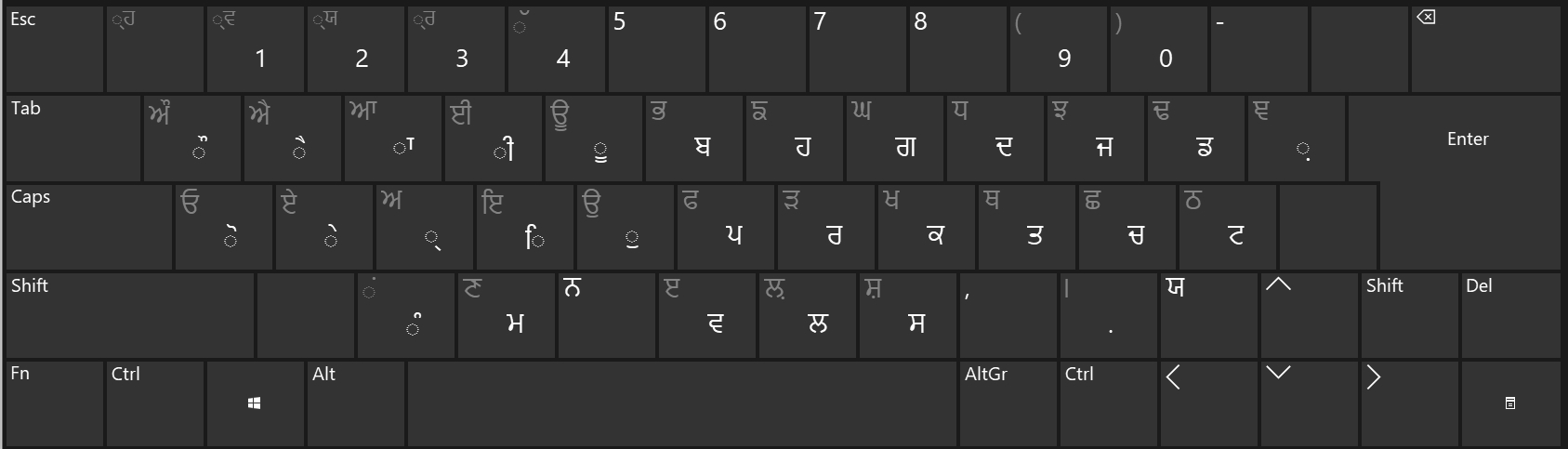
Table of Contents
- What Is an Online Punjabi Typing Test?
- Key Features of Our Punjabi Typing Test Tool
- How to Take the Punjabi Typing Test (Step by Step)
- Punjabi Typing Test for Government Exams
- Learn Punjabi Touch Typing with Finger Practice
- AI Typing Tutor for Punjabi
- Typing Certificate, Portfolio and Leaderboard
- 10 Tips to Increase Your Punjabi Typing Speed
- How Typing Speed (WPM) and Accuracy Are Calculated
- Frequently Asked Questions
What Is an Online Punjabi Typing Test?
An online Punjabi typing test measures how fast and how accurately you can type Punjabi (Gurmukhi script) on a computer keyboard. Your result is shown in words per minute (WPM) along with your accuracy percentage and the number of mistakes. Whether you are preparing for a Punjab government job, a court clerk exam, a data entry role or just want to type ਪੰਜਾਬੀ faster for daily work, regular practice on a good Punjabi typing practice platform is the quickest way to improve.
Unlike a basic text box, our tool is designed like a real exam and a real game, so practising never feels boring. You see your speed live, learn from your errors and come back every day to beat your own record.
Key Features of Our Punjabi Typing Test Tool
1. Typing Tests from 1 Minute to 1 Hour
Pick the duration that suits you: a quick 1 minute Punjabi typing test for a speed check, a 5 or 10 minute test for exam practice, or a full 1 hour typing test to build stamina. All durations are available in the online typing test selector, so you can choose exactly what you need.
2. Switch Between English and Punjabi Instantly
A simple radio button lets you switch between English and Punjabi typing. This is perfect for candidates whose exam has both an English and a Punjabi typing paper. If you also want to practise English, try our English typing tutor.
3. Choose Your Difficulty and Word Type
- Easy words - ideal for beginners learning the Gurmukhi keyboard
- Moderate words - for building steady speed
- Hard words - conjuncts, half letters and complex spellings
- Legal terms - court and law vocabulary for judicial and clerk jobs
- Technological terms - IT and office vocabulary for modern workplaces
You can also practise on different Punjabi paragraphs, so you never memorise one passage and always get fresh content.
4. Gamified Typing Engine
Our typing engine is gamified with scores, streaks and rewards to keep you motivated. You can even take a break and improve your reflexes with our free typing games, such as Bubble Blast, where every correct key pops a bubble.
5. Leaderboard - Compete with the Top 10
At the end of every test you can save your speed and see if you make it to the Top 10 leaderboard. Competing with other typists is a proven way to stay consistent.
6. Minimalist Mode - No Ads, No Distractions
Need to focus? Switch on minimalist mode and take your test without any advertisements or extra elements. Just you and the text. You can also try the minimal typing test to see how clean and distraction-free it feels.
How to Take the Punjabi Typing Test (Step by Step)
- Select the language: choose Punjabi with the radio button.
- Select the duration: from 1 minute up to 1 hour.
- Choose the exercise: easy, moderate, hard, legal or technological words, or a paragraph.
- Start typing: the timer begins when you press the first key. Correct and incorrect characters are highlighted as you go.
- Check your result: see your WPM, accuracy and errors.
- Save and share: submit your score to the leaderboard or download your certificate.
Tip: Use a Gurmukhi keyboard layout that you are comfortable with, such as Inscript or phonetic (for example, Raavi or Anmol Lipi based layouts), and stick with it while practising.
Punjabi Typing Test for Government Exams (Exam Mode)
Many government and court recruitments in Punjab and nearby states include a typing test as a qualifying or skill round. Our exam mode is built on the official exam pattern, so you practise in the same environment you will face on exam day: fixed time, fixed passage, exact marking of mistakes and a clear final result.
- Practise with the typing exam simulator to experience a real test environment.
- Try the High Court LDC typing test for court-style passages and pattern.
- Use legal-term exercises to get used to the vocabulary that appears in court and office documents.
Always read your exam's official notification for the exact required speed, time limit and marking scheme, because these can change from one recruitment to another.
Learn Punjabi Touch Typing with Finger Practice
Looking at the keyboard slows you down. Touch typing means typing without looking, using all ten fingers with each finger responsible for its own set of keys. Our finger practice guide shows the correct home row position and teaches you which finger presses which key, step by step. Beginners who spend even 15 minutes a day on finger practice usually see a clear jump in speed and a big drop in mistakes within a few weeks.
Prefer learning by video? Watch our typing tutorial playlist on YouTube.
AI-Based Typing Tutor: Personal Feedback for Every Test
After each test, our AI typing tutor analyses your performance and tells you exactly where you are weak: which letters, matras, conjuncts or words cause the most errors, and what you should practise next. Instead of repeating random exercises, you get a focused practice plan that saves time and improves speed faster.
Typing Certificate, Portfolio and Leaderboard for Jobs
- Download a typing speed certificate: show your verified WPM and accuracy in a job interview.
- Create a typing profile and portfolio: collect your best scores in one place and add the link to your resume or CV when applying for typing jobs.
- Leaderboard ranking: a high rank is a great way to prove your skills to employers.
This is especially useful for data entry, content writing, DTP, clerical, stenographer and translation jobs where Punjabi typing skill is required.
10 Tips to Increase Your Punjabi Typing Speed
- Learn the Gurmukhi keyboard layout properly before chasing speed.
- Use all ten fingers and keep your fingers on the home row.
- Focus on accuracy first; speed follows automatically.
- Practise a little every day instead of a long session once a week.
- Don't look at the keyboard. Cover it if needed.
- Practise half letters, conjuncts and matras separately.
- Sit with a straight back, relaxed wrists and the screen at eye level.
- Increase the test duration gradually from 1 minute to 10 minutes and beyond.
- Follow the AI tutor's suggestions to fix weak areas.
- Track your progress on the leaderboard and keep beating your best score.
How Typing Speed (WPM) and Accuracy Are Calculated
In most typing tests, one word equals five characters (including spaces). Net WPM is commonly calculated as:
Net WPM = (Total characters typed ÷ 5 − uncorrected errors) ÷ time in minutes
Accuracy (%) = (Correct characters ÷ Total characters typed) × 100
Some government exams use their own method (for example, counting key depressions or full word comparison), which is why our exam mode follows the official pattern.
Why Choose Our Online Punjabi Typing Test?
- 100% free to practise, works on any device with a keyboard
- Tests from 1 minute to 1 hour
- English and Punjabi in one place
- Five exercise types plus unlimited paragraphs
- Official-pattern exam mode
- AI feedback, finger practice and games
- Certificate, leaderboard and portfolio
- Ad-free minimalist mode
Frequently Asked Questions (FAQ)
What is an online Punjabi typing test?
It is a web-based test that measures your Gurmukhi typing speed in WPM and your accuracy within a fixed time, without needing to install any software.
Is this Punjabi typing test free?
Yes, you can take the Punjabi typing test and practise for free. You can also use minimalist mode for an ad-free experience.
How can I check my Punjabi typing speed online?
Select Punjabi, choose a time such as 1, 5 or 10 minutes, and start typing the given text. Your WPM and accuracy are shown immediately after the test.
Which keyboard layout should I use for Punjabi typing?
Use the layout you are most comfortable with, such as Inscript or a phonetic layout. For government exams, check which layout and font (for example, Raavi or Anmol Lipi) your exam allows and practise on the same one.
What is a good Punjabi typing speed?
Speeds vary by job and exam. As a general idea, beginners start at a low speed and most improve steadily with daily practice. Always check the required speed in your exam notification and aim to exceed it with high accuracy.
Can I use this tool to prepare for government exams?
Yes. The exam mode follows the official exam pattern. You can also use the typing exam simulator and the High Court LDC typing test for more practice.
Can I download a typing certificate?
Yes. After completing a test, you can download a typing speed certificate to show employers or add to your resume. Please note that the certificate shows your practice result on this site and is not an official government document.
Can I switch between English and Punjabi?
Yes, use the radio button to switch languages anytime. For English-only practice, visit the English typing tutor.
How do I learn touch typing in Punjabi?
Start with the finger practice guide, learn the home row, and practise slowly with high accuracy before increasing speed.
How does the AI typing tutor help me?
It reviews your mistakes and shows which characters and words you struggle with, then recommends what to practise so you improve faster.
Is there a distraction-free mode?
Yes, minimalist mode removes ads and extra elements so you can concentrate fully on typing.
Are there typing games to make practice fun?
Yes. Try our typing games, including Bubble Blast, to improve speed while having fun.
Start Your Punjabi Typing Test Now
Scroll up to the tool, select Punjabi, pick your time and begin. Practise daily, follow the AI tutor, climb the leaderboard and download your certificate. Your next typing job or exam success could be just a few keystrokes away. Take the online typing test today!