🧊
+1
0 WPM
Highlit
Back
Odia
En
⏱️ :
60
 Loading...

Inscript Keyboard
NOTE: If you have a correct keyboard layout installed on your computer, uncheck the above box.
Press ALT + 0256 for this charecter
Change Font : Krutidev 010
Change Test :
Random Words
▼
LEADER-BOARD
GLOBAL RANKING (TOP 10)
GLOBAL RANKING (TOP 10)
Online Odia Typing Test - Free ଓଡ଼ିଆ Typing Speed Test (1 to 60 Minutes)
Take a free online Odia typing test to improve your Odia and English typing speed, accuracy, and confidence. Choose a 1-minute typing test for a quick check or practice for up to 1 hour with easy words, moderate words, hard words, legal terms, technical terms, and exam-style paragraphs. The tool is gamified, includes a leaderboard, AI typing tutor feedback, government exam mode, finger-position training, and a downloadable typing certificate.
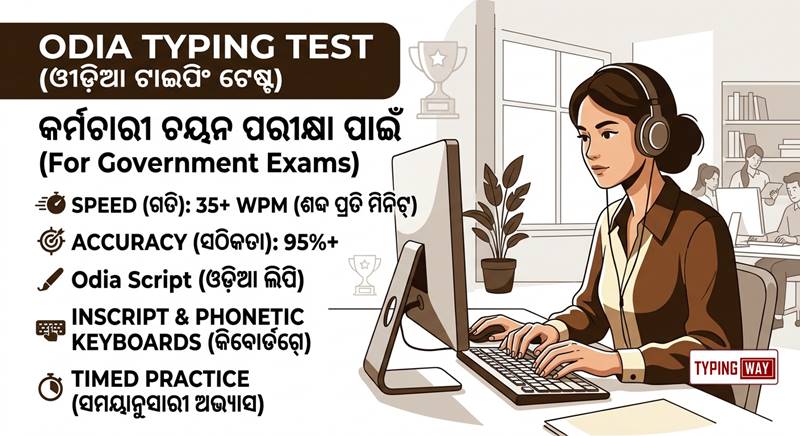
What Is an Online Odia Typing Test?
An Odia typing test online measures how many words you can type correctly in a fixed time. Your result is shown in WPM (words per minute), accuracy percentage, errors, and total characters typed. This makes it ideal for students, data-entry aspirants, government-job candidates, freelancers, and anyone who wants to type Odia faster.
You can switch between Odia and English using the language radio button, then select your preferred exercise. The tool supports short practice sessions as well as long-duration tests, so you can build both speed and stamina.
Key Features of the Odia Typing Tool
- 1 minute to 1 hour tests: Select any duration—from a quick 1-minute speed test to a full 60-minute endurance practice.
- Odia and English mode: Easily toggle between Odia and English typing using the radio button.
- Multiple exercise levels: Practice easy words, moderate words, hard words, legal terminology, and technological terms.
- Paragraph practice: Improve real-world typing with complete Odia and English paragraphs.
- Gamified typing engine: Earn scores, stay motivated, and compete with other typists.
- Leaderboard: Save your speed after a test and compete for a place in the top 10 users.
- Typing profile and portfolio: Create a profile and build a typing portfolio you can showcase on your resume.
- Typing certificate: Download a certificate of typing speed to show during job interviews.
- Government exam mode: Practice using an exam-pattern-based interface for Odisha government typing exams.
- Finger practice guide: Learn correct touch-typing finger placement and build muscle memory.
- AI typing tutor: Get feedback on weak keys, common mistakes, accuracy issues, and areas needing more practice.
- Minimalist mode: Hide distractions and advertisements for focused typing practice.
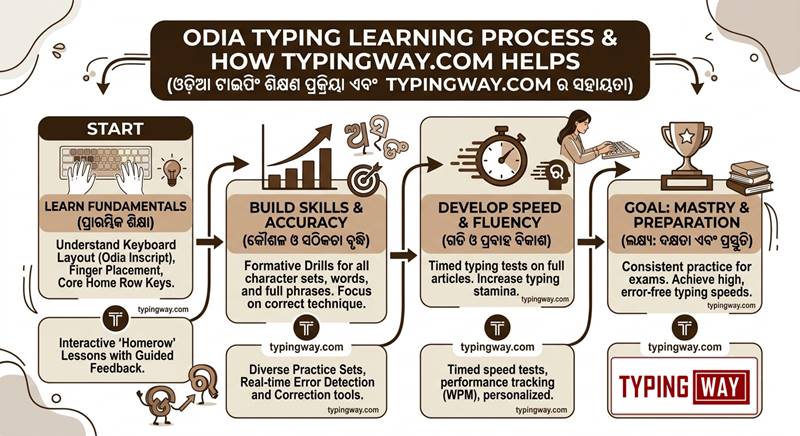
Why Practice Odia Typing?
Odia typing is important for government recruitment, clerical work, data entry, translation, content writing, and office documentation in Odisha. Many Odisha government typing assessments evaluate both speed and accuracy, and candidates are commonly expected to use the Odia InScript keyboard layout rather than phonetic typing.
A good typing test should not only show your speed—it should show where you are losing marks. This tool provides real-time WPM and accuracy tracking, so you can identify whether you need to improve finger placement, reduce backspace use, or practice difficult Odia conjunct characters.
Choose Your Typing Duration
| Duration | Best For | Goal |
|---|---|---|
| 1 minute | Quick daily speed check | Measure current WPM |
| 5 minutes | Warm-up and accuracy practice | Build consistency |
| 10 minutes | Government exam preparation | Improve exam stamina |
| 15-30 minutes | Serious daily practice | Increase net speed |
| 60 minutes | Professional typing training | Build endurance and accuracy |
For best results, begin with a 1-minute Odia typing test, record your score, and then move to 5- or 10-minute sessions. Once your accuracy is stable, use longer tests to prepare for real typing exams.
Practice Odia and English Typing
The tool lets you practice both languages without leaving the page. Use the Odia mode for Odia script practice and the English mode for general typing speed, office work, and English-language exams.
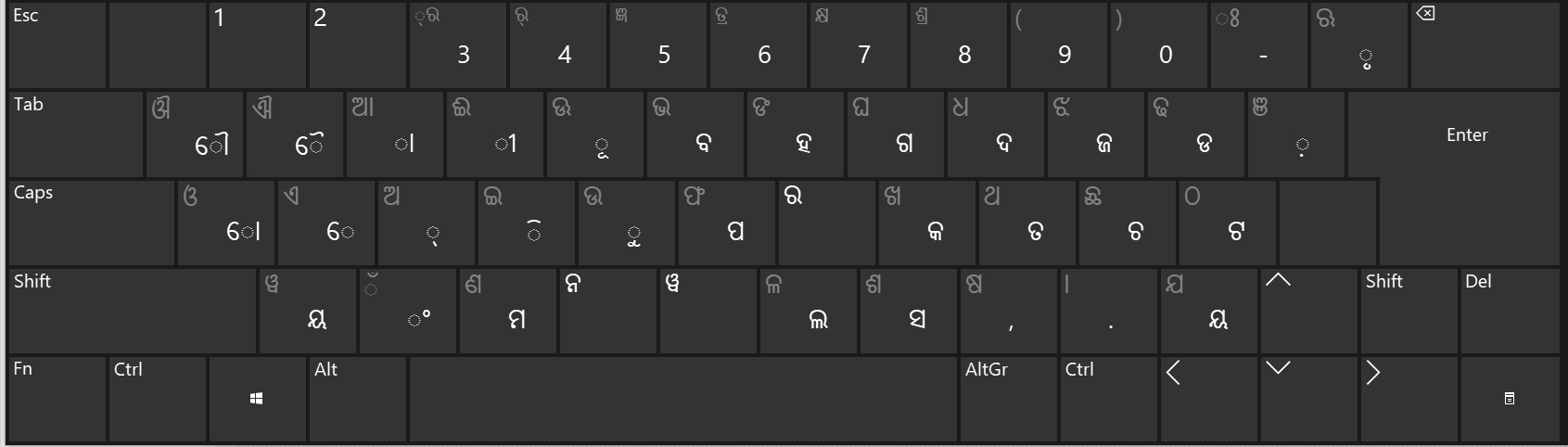
If you are preparing for Odisha government recruitment, focus on Odia InScript practice. Official Odisha typing exams generally use the InScript layout, while phonetic or transliteration keyboards are not accepted in many government tests.
For structured English improvement, try the English typing tutor. It helps you build correct habits from the home row before increasing speed.
Exercise Types for Faster Learning
Choose the exercise that matches your current skill level:
- Easy words: Best for beginners learning finger positions and basic Odia characters.
- Moderate words: Ideal once you can type simple words without looking at the keyboard.
- Hard words: Improve accuracy with difficult spellings, conjuncts, and complex words.
- Legal terms: Useful for court, legal documentation, and clerical typing jobs.
- Technological terms: Practice modern technical vocabulary for IT, data-entry, and office roles.
- Paragraphs: Develop rhythm, reading speed, and real exam-style typing flow.
Do not chase speed too early. First aim for 95%+ accuracy, then gradually increase WPM. Many typing exams prioritise accuracy because errors reduce net speed.
Gamified Leaderboard and Typing Portfolio
After completing a test, save your result to appear on the leaderboard. The top 10 users are displayed, creating a competitive and motivating environment for daily practice.
You can also create a profile and maintain a complete typing portfolio. This is useful when applying for data-entry, transcription, content operations, back-office, and typing-related jobs. Instead of only saying “good typing speed” on your resume, you can show verified practice history, WPM, accuracy, and certificates.
Download a Typing Speed Certificate
After achieving a strong score, download your typing speed certificate. It can be helpful in job interviews, freelance profiles, and skill-based applications where employers want proof of typing ability.
A certificate is most valuable when your underlying accuracy is strong. Practice until you can consistently maintain a high accuracy level across multiple test durations.
Government Exam Mode for Odisha Typing Tests
The exam mode is designed to simulate government typing test conditions. It helps you practise under time pressure with exam-style passages and a structured scoring approach.
Odisha recruitment tests often include Odia typing components for posts such as Junior Assistant, typist, data-entry operator, and clerical roles. Required speeds can vary by post, with common benchmarks ranging from around 16 WPM to 30 WPM depending on the examination and role.
For realistic mock-test preparation, use the typing exam simulator. It is especially useful for building exam temperament, time management, and error control.
Learn Touch Typing With Finger Practice
Touch typing means typing without looking at the keyboard. The finger practice guide teaches you which finger should press each key, helping you avoid bad habits such as hunting for keys or using only two fingers.
Start with the home row, then practise each finger separately. Consistent daily practice is more effective than one long session once a week. Use the finger practice guide to set your fingers correctly and develop long-term speed.
AI Typing Tutor Feedback
The AI-based typing tutor reviews your performance and tells you where you need improvement. It can highlight:
- Keys or characters where you make repeated mistakes
- Words that slow down your typing speed
- Accuracy problems caused by rushing
- Finger-position weaknesses
- Whether you should practise easy, moderate, or hard exercises
This makes your practice targeted instead of random. Rather than repeating the same test, you can focus on the exact weakness limiting your WPM.
Minimalist Mode for Distraction-Free Practice
If advertisements or interface elements distract you, switch to minimalist mode. This clean view removes unnecessary visual noise so you can focus completely on the passage, timer, and keystrokes.
For a distraction-free English session, try the minimal typing test. Minimalist practice is especially helpful before an exam or when you are trying to break a personal WPM record.
Typing Games for Daily Motivation
Typing games make practice enjoyable and help improve reaction time, word recognition, and finger coordination. Play short games between serious tests to stay consistent without feeling bored.
Try typing games or the fast-paced Bubble Blast typing game for a fun warm-up before your Odia typing test.
How to Take the Online Odia Typing Test
- Select Odia or English using the language radio button.
- Choose your test duration: 1 minute, 5 minutes, 10 minutes, 30 minutes, or up to 1 hour.
- Select an exercise: easy words, moderate words, hard words, legal terms, technical terms, or paragraphs.
- Place your fingers on the home row and start typing.
- Avoid unnecessary backspaces and focus on accuracy.
- Check your WPM, accuracy, and error report after the test.
- Save your score to compete on the leaderboard.
- Download your certificate once you reach your target speed.
You can also explore more test formats through the online typing test selection page.
Tips to Increase Odia Typing Speed
- Practise 20-30 minutes daily rather than typing for hours once a week.
- Keep your eyes on the screen, not the keyboard.
- Focus on accuracy before speed; errors reduce net WPM.
- Use the correct finger for every key.
- Practise difficult Odia conjuncts and frequently used words separately.
- Take a 1-minute test daily to track progress.
- Use exam mode in the final stage of preparation.
- Avoid phonetic typing habits if your target exam requires InScript.
Who Should Use This Odia Typing Test?
- Students preparing for Odisha government exams
- OSSC, OSSSC, OPSC, and other state-level typing-test aspirants
- Data-entry operator candidates
- Clerks, typists, and office assistants
- Freelancers and content writers
- Users who want to learn Odia InScript typing
- Anyone who wants to improve English typing speed
For High Court LDC-style preparation, see the High Court LDC typing test. For video-based learning, watch the typing tutorial playlist on YouTube.
Frequently Asked Questions (FAQ)
What is an online Odia typing test?
An online Odia typing test is a browser-based tool that measures your Odia typing speed in WPM and accuracy percentage. You can choose the duration, exercise type, and language mode before starting.
Is this Odia typing test free?
Yes. The online Odia typing test is free to use. You can take multiple tests, practise paragraphs, use exam mode, and track your progress.
Can I take a 1-minute Odia typing test?
Yes. The tool offers a 1-minute typing test, along with longer options up to 1 hour. A 1-minute test is ideal for checking your current speed quickly.
Can I switch between Odia and English?
Yes. Use the radio button to switch between Odia and English. This allows you to practise both languages in one platform.
Which keyboard should I use for Odia typing?
For government exam preparation, use the Odia InScript keyboard layout. Many Odisha government typing tests use InScript, while phonetic or transliteration input may not be allowed.
What is a good Odia typing speed?
A good target is 30 WPM with high accuracy for many typing-based government roles, though exact requirements vary by exam and post. Some assessments may require lower qualifying speeds, while typist and stenographer roles can require more.
How can I improve my Odia typing speed?
Practise daily, use the finger practice guide, focus on accuracy, repeat difficult words, and take timed tests. The AI typing tutor helps identify the exact areas where you need improvement.
Can I download a typing certificate?
Yes. After completing a test and achieving a good score, you can download a typing speed certificate to show in job interviews or add to your resume.
Does the tool have a leaderboard?
Yes. The gamified engine lets you save your speed and compete on a leaderboard where the top 10 users are listed.
Is there an exam mode for government typing tests?
Yes. The government exam mode is built on an exam-pattern approach and helps you practise under timed, exam-like conditions.
Can I create a typing portfolio?
Yes. You can create a profile and build a typing portfolio with your test results, speed, accuracy, and certificates. This can be useful when applying for typing or data-entry jobs.
Does the tool work on mobile?
You can access the tool on mobile, but a physical keyboard is recommended for serious typing practice and government exam preparation.
What is minimalist mode?
Minimalist mode removes distractions such as advertisements and extra interface elements, giving you a clean and focused typing environment.
Is paragraph practice available?
Yes. Along with easy, moderate, hard, legal, and technical word exercises, you can practise complete Odia and English paragraphs.