🧊
+1
0 WPM
Highlit
Back
Kannada
En
⏱️ :
60
 Loading...

Inscript Keyboard
NOTE: If you have a correct keyboard layout installed on your computer, uncheck the above box.
Press ALT + 0256 for this charecter
Change Font : Krutidev 010
Change Test :
Random Words
▼
LEADER-BOARD
GLOBAL RANKING (TOP 10)
GLOBAL RANKING (TOP 10)
Kannada Typing Test Online: Practise Kannada Typing for Free
Need to type in Kannada but still find the keyboard a little confusing? You’re not alone. It can take a bit of practice to get used to Kannada characters, vowel signs and the way words are entered on a computer. The good news is that you don’t need to master everything in one sitting. A few focused practice sessions can help you feel more comfortable and make fewer mistakes.
Use the Kannada typing test above to get started. Practise at a pace that feels manageable, pay attention to the words you find difficult, and gradually work towards typing longer passages. Whether you’re learning for everyday use, writing Kannada content or preparing for a typing assessment, regular practice is a sensible place to begin.
What is a Kannada typing test?
A Kannada typing test gives you a chance to enter Kannada text using a keyboard and check how well you do. Depending on the tool, you may see information about your speed, accuracy, completed text or typing errors. These results can help you understand what is going well and what needs more attention.
Online practice is convenient because you can open a test in your browser without necessarily installing a separate program. The important thing is to check which Kannada input method the tool supports and use one that suits your needs.
Kannada typing practice can be useful for students, office workers, writers, content creators and anyone who regularly needs to type in Kannada. If you’re preparing for a recruitment test, check the official instructions first: the required keyboard layout, input method and qualifying speed can vary between examinations.

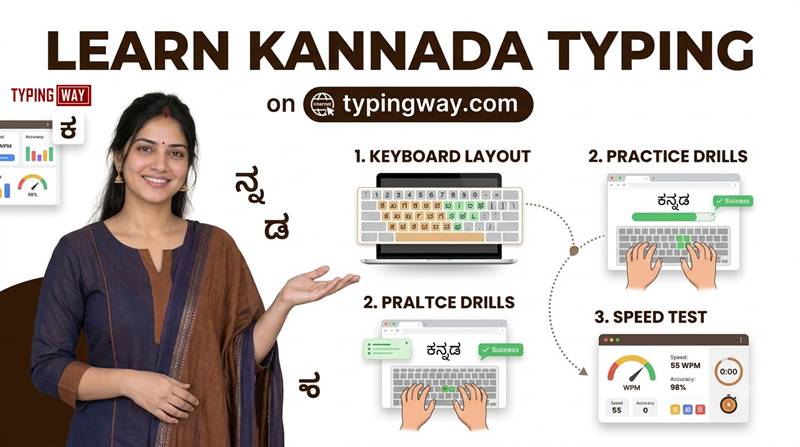
How to start practising Kannada typing
- Open the typing test above. Read the on-screen instructions before you begin.
- Check the input method. Kannada can be entered using different keyboard layouts or phonetic input tools. Make sure you know which method the test expects.
- Start slowly. Focus on entering the right characters rather than racing through the text.
- Practise words and sentences. Once individual characters feel more familiar, move on to complete words and short paragraphs.
- Review your results. If the tool shows mistakes or accuracy, use that feedback to decide what to practise next.
If you’re a beginner, don’t worry if your first few attempts feel slow. Learning a new input method takes time. It’s better to build reliable habits now than to rush and repeat the same mistakes later.
Understand the Kannada input method you are using
Not every Kannada typing tool works in the same way. With a dedicated keyboard layout, characters are assigned to particular keys. With phonetic typing or transliteration, you enter sounds using another keyboard language and the software converts them into Kannada text.
Both approaches can be useful, but they are not interchangeable. If you need Kannada typing for a specific examination or workplace, learn the method required there. If you’re typing casually, choose a method that works well with your device and the software you use.
It also helps to become familiar with Kannada vowels, consonants, vowel signs and common character combinations. Practise a small set at a time, then use those characters in real words. Seeing how they work in context is often more useful than memorising a long list all at once.
Practical ways to improve Kannada typing speed and accuracy
Get the characters right before trying to go faster
It’s tempting to chase a high score straight away, but speed doesn’t help much if every other word needs correcting. Begin at a comfortable pace and work on accuracy. As the input method becomes more familiar, you can gradually pick up speed.
Practise a little each day
Try setting aside 10–20 minutes for focused practice, if that fits your schedule. One session might be enough to work on difficult character combinations, type a short paragraph and finish with a timed test. Consistency is more useful than doing one very long session and then leaving it for a week.
Pay attention to repeated mistakes
If you keep making the same error, pause and work out why. It may be an unfamiliar key, a character combination you haven’t learnt properly, a spelling mistake or simply typing before you have read the reference text carefully. Practise that specific area instead of repeating the entire test without a plan.
Move from short exercises to full paragraphs
Short words are useful when you’re learning, but longer passages help you practise spacing, punctuation, reading ahead and keeping a steady rhythm. Mix both kinds of practice rather than doing only one.
Keep your hands and shoulders relaxed
Sit comfortably, keep your shoulders relaxed and avoid bending your wrists into an awkward position. Take a short break if your hands feel tired. Tense hands can make typing uncomfortable and harder to sustain.
A useful routine: warm up with familiar words, spend a few minutes on your difficult characters or combinations, then take a timed test. Finish by reviewing what went wrong. This gives each practice session a clear purpose.
How is Kannada typing speed measured?
Typing speed is often shown as words per minute (WPM), while accuracy describes how closely the typed text matches the expected text. However, Kannada and English use different writing systems, and typing tools may calculate speed differently. Some use a word-based measure; others may rely on characters or a different scoring method.
For that reason, don’t assume that a Kannada WPM score is directly comparable with an English score—or with the result from another Kannada typing website. Check how the tool calculates its score. If you’re preparing for an examination, use the scoring rules specified by the exam authority.
- Speed: how quickly you enter the text according to the tool’s measurement.
- Accuracy: how much of the text you enter correctly.
- Consistency: whether you can maintain your performance across several sessions.
- Error recovery: how well you identify and correct mistakes.
Common Kannada typing mistakes to avoid
Trying to type too quickly at first
Rushing often leads to wrong characters and frequent corrections. Slow down until the input method feels more natural, then increase your pace little by little.
Switching input methods too often
Moving between different layouts and transliteration tools can make it harder to build familiarity. Choose the method that fits your goal and stick with it during a practice session.
Ignoring spelling and character combinations
A small difference in a character or vowel sign can change the word you intended to type. Read the reference carefully and pay attention to the details rather than focusing only on the timer.
Practising without reviewing results
Repeating tests can be useful, but you’ll learn more if you notice where the mistakes happen. Pick one or two things to improve in your next session.
Comparing scores from different tools
Typing tests may use different passages, input methods and scoring rules. For a fair comparison, use the same tool and similar settings over time.
A simple seven-day Kannada typing practice plan
If you’re not sure where to start, use this as a flexible first-week plan. Spend more time on any step that feels difficult; there’s no need to rush through it.
| Day | Practice | Focus |
|---|---|---|
| 1 | Explore your input method and practise basic characters | Familiarity |
| 2 | Practise vowels, consonants and combinations | Accuracy |
| 3 | Type common Kannada words | Word formation |
| 4 | Practise short sentences | Spacing and rhythm |
| 5 | Type a few complete paragraphs | Continuous typing |
| 6 | Take a timed typing test | Speed and accuracy |
| 7 | Repeat a similar test and review mistakes | Progress review |
The aim isn’t to reach a particular speed in seven days. It’s to establish a routine and get a clearer idea of what you need to work on next.
Explore more typing tools on Typingway
If you’re working on your overall keyboard skills as well as Kannada, these other Typingway resources may be useful. Some focus on other languages or general keyboard practice, so choose the ones that match your goal.
- Explore online typing tests to find other available language and practice options.
- Try the Hindi typing test if you also need to practise typing in Hindi.
- Use finger practice to work on keyboard familiarity and coordination.
- Explore typing games for a change of pace between focused exercises.
- Try Bubble Blast for another typing activity.
- Explore the typing exam simulator and check whether its available settings suit your preparation.
- Use the minimal English typing test if you want a simpler English practice interface.
- Explore the English typing tutor for structured English typing lessons.
- Find typing teachers if you would prefer additional guidance.
- View the Typingway app on Google Play to check its features and whether it suits your device.
- Watch Typingway video lessons for visual guidance on typing skills.
Frequently asked questions about Kannada typing
1. Where can I practise Kannada typing online for free?
You can start with the Kannada typing test at the top of this page. Read the instructions, check the input method and begin with a short exercise before trying longer passages.
2. Can I practise Kannada typing without installing software?
A browser-based typing test can let you practise without installing a separate desktop application. Whether you need a particular keyboard or input tool depends on how the test works.
3. How can I increase my Kannada typing speed?
Practise regularly, learn your chosen input method, work on accuracy and gradually increase the length of the text. Reviewing repeated mistakes can be more helpful than simply taking test after test.
4. Is Kannada typing the same as English typing?
No. Kannada uses a different writing system, and entering its characters and combinations differs from typing English. The input method and the way speed is calculated may differ too.
5. Which Kannada keyboard layout should I learn?
That depends on why you need to type Kannada. If an examination or workplace specifies a particular layout or input method, learn that one. For everyday use, choose a method compatible with your device and software.
6. Can a complete beginner use this typing test?
Yes, provided the input method is suitable for you. Start slowly, practise familiar characters and words, and build towards sentences and paragraphs as you become more comfortable.
7. How long should I practise each day?
Ten to twenty minutes can be a reasonable starting point. Adjust the time to your schedule and comfort, and take breaks if your hands feel tired.
8. What does WPM mean in a Kannada typing test?
WPM usually means words per minute, but typing tools can use different methods to calculate speed. Check the test’s scoring method before comparing your result with another tool or language.
9. Is Kannada typing useful for government jobs?
It may be useful for positions or examinations that require Kannada-language computer skills. Requirements vary, so check the relevant official notification for the language, input method, speed and qualifying rules.
10. Can daily practice help me type Kannada more confidently?
Regular, focused practice can help you become more familiar with the input method and improve your performance over time. Progress depends on your starting level, practice habits and the method you use.
11. Should I focus on speed or accuracy first?
For most beginners, accuracy is the better starting point. Once you can enter text correctly and consistently, increase your speed gradually.
12. Do typing games replace Kannada typing practice?
Games can make general keyboard practice more enjoyable, but they may not teach the Kannada input method you need. Combine them with exercises that specifically involve Kannada text.
Give your Kannada typing practice a start
You don’t have to learn everything at once. Start with a short passage, get comfortable with the input method, and pay attention to the mistakes you make. As familiar words become easier, move on to longer text and timed practice.
Use the Kannada typing test above whenever you have a few minutes to practise. A steady routine and a little patience can help you become more confident typing Kannada on a computer.