🧊
+1
0 WPM
Highlit
Back
Bangla
En
⏱️ :
60
 Loading...
Inscript Keyboard
NOTE: If you have a correct keyboard layout installed on your computer, uncheck the above box.
Press ALT + 0256 for this charecter
Change Font : Krutidev 010
Change Test :
Random Words
▼
LEADER-BOARD
GLOBAL RANKING (TOP 10)
GLOBAL RANKING (TOP 10)
Bangla Typing Test: Check Your Speed, Accuracy and WPM Online
Whether you are preparing for a government job exam, working as a data entry operator, or simply want to type faster in your mother tongue, a regular Bangla typing test is the most reliable way to measure your progress. Typing in Bengali is not the same as typing in English. The script has hundreds of conjuncts (যুক্তাক্ষর), vowel signs that attach in different positions, and several keyboard layouts to choose from. That is why focused practice matters.
Our free Bangla typing test online gives you a clean, distraction-free interface where you can check your typing speed, accuracy, and words per minute (WPM) in a few minutes. This guide explains how the test works, how speed is calculated, which keyboard layout to choose, and the practical techniques that help you improve quickly.
What Is a Bangla Typing Test?
A Bangla typing test is a timed exercise in which you type a given passage of Bengali text as quickly and accurately as you can. When the timer ends, the tool compares what you typed with the original text and reports your results: speed in words per minute, accuracy as a percentage, and the number of errors.
Unlike casual typing, a test creates mild pressure and a clear benchmark. You can see exactly where you stand today and compare it with your result next week. This is why a Bengali typing test is used by students, job seekers, content writers, and office professionals alike. The same idea works for any language: if you also type in English, you can take a general online English typing test and compare your speed across both scripts.
Why You Should Practice Bengali Typing
Bengali is spoken by more than 250 million people, and digital content in the language is growing every year. Typing fluently in Bangla opens many doors:
- Exam preparation: Many government and clerical recruitment processes include a Bengali typing skill requirement. You can rehearse with our government exam typing simulator and model test papers.
- Career opportunities: Data entry, transcription, content writing, translation, journalism, and customer support roles value fast, accurate Bangla typists.
- Productivity: Writing emails, social media posts, and documents in your own language is much faster when you are not hunting for keys.
- Academic work: Students writing assignments or research in Bengali save hours with better typing skills.
- Confidence: Regular Bangla typing practice reduces mistakes and makes you comfortable with complex conjunct characters.
How Our Bangla Typing Speed Test Works
We designed this Bangla typing speed test to be simple and exam-friendly. You do not need to sign up, install anything, or learn a new interface. Here is the process:
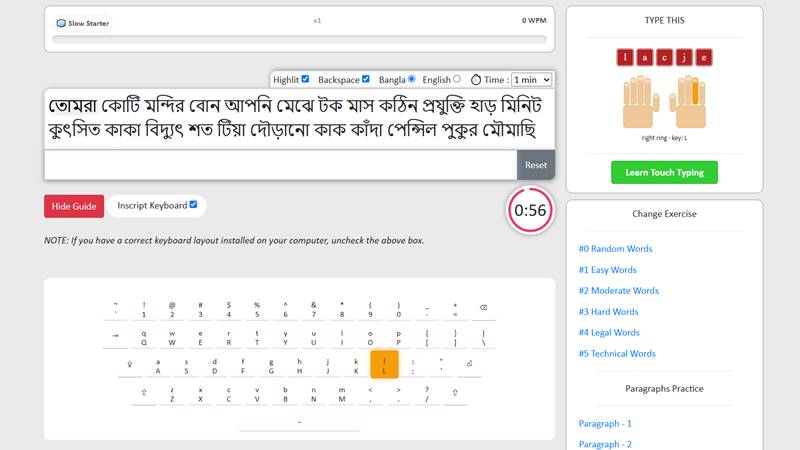
- Choose your duration. Select a time limit such as one, three, or five minutes, depending on your goal.
- Read the passage. A Bengali paragraph appears on the screen. Take a moment to look at it before you begin.
- Start typing. The timer begins as soon as you press the first key. Type the text exactly as shown, including punctuation.
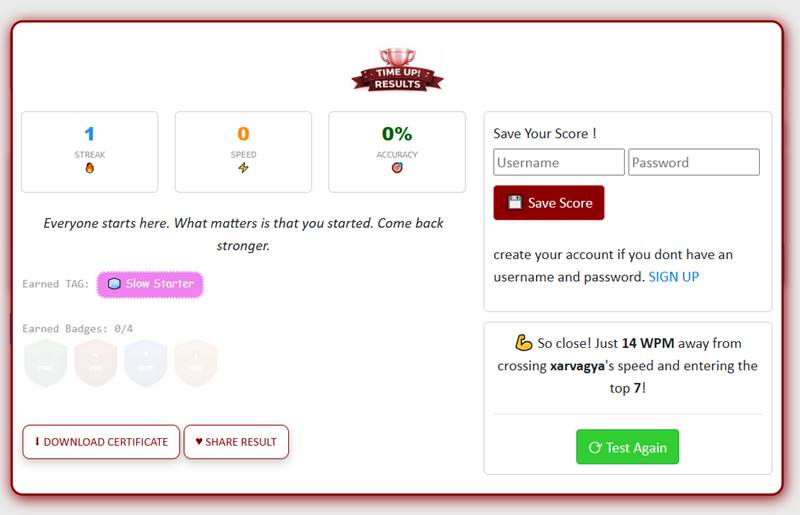
- Finish and review. When time is up, you will see your WPM, accuracy, and mistakes so you know precisely what to improve.
- Repeat. Try again with a new passage. Consistency beats occasional long sessions.
Make sure your device has a Bengali keyboard or input method enabled before you start. Without one, the characters you type will not match the passage. If you prefer practicing on the go, you can also use the Typingway Android app, and if you want to practice without an internet connection, our offline typing test software is available too.
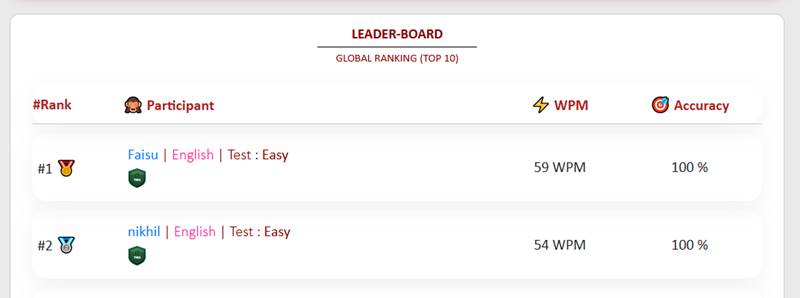
Every test also feeds into a ranking, so you can see how your score compares with other learners and keep yourself motivated:
How Bangla Typing WPM Is Calculated
WPM stands for words per minute. In English, a "word" is conventionally counted as five characters. Bengali is more varied, because a single conjunct can be one visual unit made from several keystrokes. For that reason, tools and exams may count in slightly different ways: by actual words separated by spaces, or by a standard number of characters or keystrokes.
A common formula for a Bangla typing WPM test looks like this:
- Gross WPM = total words typed ÷ time in minutes
- Net WPM = (total words typed − uncorrected errors) ÷ time in minutes
Net WPM is the more honest number because it penalizes mistakes. If you type 40 words in one minute but make 5 errors, your net speed is 35 WPM. When you prepare for an exam, always check which calculation method the exam uses so that your practice matches the real thing.
As a rough guide, many learners start between 10 and 20 WPM in Bengali. With steady practice, 25 to 35 WPM is a realistic target for job tests, and experienced typists can go well beyond that.
Understanding the Bangla Typing Accuracy Test
Speed alone is not enough. A fast typist who makes many errors spends more time correcting than a slower, careful one. That is why our Bangla typing accuracy test displays your accuracy percentage next to your speed, as shown in the result screen above.
Accuracy is calculated as the number of correct characters or words divided by the total typed, multiplied by 100. In practice:
- 95% or higher is a strong result and is usually acceptable for most tests.
- 90 to 95% is decent but shows room for improvement.
- Below 90% suggests you should slow down and focus on correct finger placement.
In Bengali, typical accuracy errors include a missing vowel sign (কার), the wrong conjunct, confusion between similar letters such as ণ/ন or শ/ষ/স, and incorrect use of the hasanta (্). Reviewing your errors after each test shows which of these you struggle with.
Bangla Keyboard Layouts Compared
Choosing the right layout is the first step in Bangla keyboard practice. Each has strengths, and the best one depends on your goals.
| Layout | Type | Best For | Learning Curve |
|---|---|---|---|
| Phonetic (e.g., Avro) | Roman letters produce Bengali sounds | Beginners and casual typing | Easy |
| Bijoy | Fixed Bengali key positions | Professional typists and many office or exam settings in Bangladesh | Moderate to steep |
| Unicode fixed layouts (e.g., Probhat) | Fixed layout with Unicode output | Users who want speed with modern compatibility | Moderate |
| Bengali InScript | Standard layout used across Indian languages | Users in India, and those who type in multiple Indian scripts | Moderate |
If you are new, a phonetic layout lets you start typing within minutes. Avro is the most popular choice, and its on-screen layout looks like this:
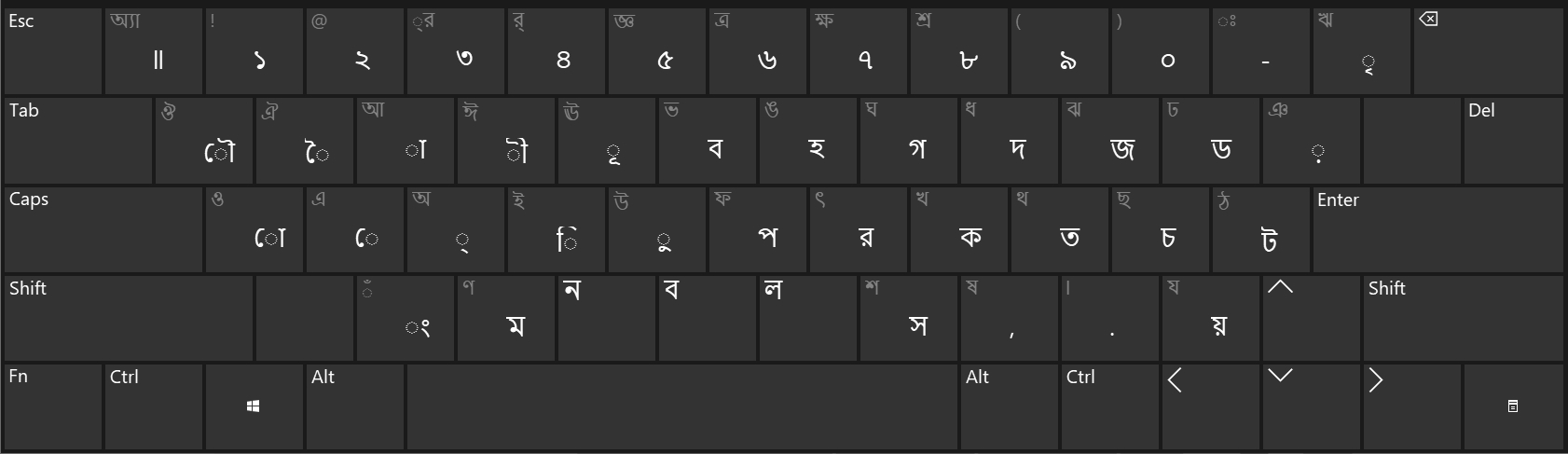
If you aim for the highest possible speed or your exam specifies a layout, a fixed layout is usually the better long-term investment. Whichever you choose, stick with it. Switching layouts repeatedly slows your progress.
The InScript layout is worth special attention if you type in more than one Indian language, because the key positions are shared across scripts. Once you know it, moving to another script is much easier. You can try the same layout in a Mangal font Hindi typing test. If your exam instead uses a legacy font, practice with the Hindi typing test or the Marathi typing test in that style.
12 Tips to Improve Your Bangla Typing Speed
Improvement comes from deliberate practice, not just more hours. Use these proven techniques in your Bangla typing practice online sessions.
1. Master the home row first
Place your fingers on the home row keys and return to them after every keystroke. This builds the muscle memory that all fast typists rely on. Our finger practice tool is a handy way to drill each finger separately.
2. Stop looking at the keyboard
Touch typing is the biggest single speed boost. If you need to, cover your hands with a cloth or sticker the key labels. It feels slow at first, but it pays off within weeks. A structured lesson plan helps here, and the English typing tutor and Hindi typing tutor teach touch typing step by step, with skills that carry over to Bengali.
3. Prioritize accuracy before speed
Aim for 95% accuracy first. Speed follows naturally once your fingers know where to go. Typing fast with errors only trains mistakes into your memory.
4. Learn conjuncts as units
Frequently used conjuncts such as ক্ষ, ত্র, স্ত, ন্ত, and দ্ধ should become automatic. Practice them in short drills until you no longer think about the key sequence.
5. Practice with real Bengali text
Random letters do not reflect real writing. Typing news articles, stories, and formal paragraphs prepares you for what you will actually face in a Bengali typing speed test online.
6. Keep a steady rhythm
An even pace beats bursts of speed followed by pauses. Imagine typing to a metronome and try to keep each keystroke evenly spaced.
7. Maintain good posture
Sit upright with your wrists relaxed and your elbows at roughly a right angle. Good ergonomics reduces fatigue and lets you practice for longer.
8. Use short, frequent sessions
Fifteen to thirty minutes every day is more effective than a three-hour session once a week. Your brain consolidates motor skills during rest. To keep sessions fun, mix in a few minutes of typing games such as Bubble Blast, Typing Heat, Fire Click, Aim Lab, or Theta Flux, which sharpen reaction time and finger coordination.
9. Review your mistakes
After each test, note which words caused errors and drill those specifically. Over time, your weak spots shrink.
10. Do not hit backspace for every error in practice mode
Know the rules of the exam you are preparing for. In some tests, corrections are allowed and cost time. In others, errors are simply counted. Practice the way you will be tested.
11. Warm up before a test
Type a short paragraph or stretch your fingers before attempting a timed test. Cold hands tend to produce more errors.
12. Track your progress
Write down your WPM and accuracy after each session. Seeing the numbers climb is motivating and shows you whether your current approach is working. If you prefer learning by watching, these video tutorials on typing practice walk through the techniques in this guide.
Bangla Typing for Government and Job Exams
Many recruitment processes for clerical, data entry, and office assistant positions include a typing component in Bengali, English, or both. Requirements vary widely by organization, post, and year. Some set a minimum WPM, some specify the keyboard layout, and some allow a fixed number of errors. Always read the latest official notification carefully so you know the exact speed, time limit, and software or layout in use.
Here is how to prepare effectively:
- Find out the required WPM and the method used to count words.
- Practice on the same keyboard layout that the exam will use.
- Take full-length timed tests regularly, not just short drills. The typing exam simulator offers model test papers that mirror real government exam conditions.
- Train yourself to type under mild pressure so exam day nerves matter less.
- Aim to exceed the minimum requirement by a comfortable margin, so a bad day does not cost you the result.
Using an exam-friendly Bangla typing test online like this one lets you simulate real conditions from home, whenever you have a few spare minutes.
Common Bengali Typing Mistakes and How to Avoid Them
- Wrong vowel sign order: In Bengali, some vowel signs appear visually before the consonant but are typed after it in Unicode. Learn the typing order for your layout.
- Misusing the hasanta: Forgetting or adding an extra hasanta changes the conjunct entirely. Slow down on difficult conjuncts.
- Confusing similar letters: Pairs like ণ/ন, শ/ষ/স, and ড়/র lead to spelling errors. Read the passage carefully before typing it.
- Skipping punctuation: The Bengali danda (।) is easy to forget. Tests count it, so include it.
- Extra spaces: Double spaces register as errors in many tests. Keep spacing consistent.
- Rushing the first line: Many people start too fast, make mistakes, and lose confidence. Start at a controlled pace and build up.
A Simple 30-Day Plan to Improve Your Bengali Typing
If you want structure, follow this plan. Adjust the timing to suit your schedule.
Week 1: Build the foundation
Choose one keyboard layout. Learn the home row and the most common letters. Spend 20 minutes a day on slow, accurate typing. Take one short test at the end of the week to set your baseline.
Week 2: Expand and drill
Cover the full keyboard, including vowel signs and numerals. Add 10 minutes of conjunct drills every day. Take two short tests, and aim for at least 90% accuracy.
Week 3: Build speed with real text
Switch to full paragraphs. Practice 25 to 30 minutes a day, and take a three-minute test every second day. Review your errors and repeat the passages that gave you trouble.
Week 4: Simulate the exam
Take timed tests at the length your exam requires. Focus on keeping accuracy above 95% while pushing your WPM slowly higher. Rest the day before your actual test.
By the end of 30 days, most dedicated learners see a clear gain in both speed and confidence. Keep practicing after that to maintain your progress.
Frequently Asked Questions About the Bangla Typing Test
Is this Bangla typing test free?
Yes. You can take the Bangla typing test as many times as you like without paying or creating an account.
How can I check my Bangla typing speed?
Start the test, type the displayed passage until the timer ends, and your result will show your speed in WPM along with accuracy and errors.
What is a good Bangla typing speed?
It depends on your goal. Beginners often type 10 to 20 WPM. For many job tests, 25 to 35 WPM with high accuracy is a solid target. Professional typists may exceed that. Always check the exact requirement for your exam.
Which keyboard layout is best for Bengali typing?
Phonetic layouts are easiest for beginners. Fixed layouts such as Bijoy, Probhat, or InScript are often preferred by professionals and may be required in certain exams. Use the layout that matches your goal and stay consistent.
Can I practice Bengali typing on my phone?
You can, but a physical keyboard is far better for building real typing speed and for exam preparation. Phone typing uses a different set of skills. If you want to practice on mobile anyway, the Typingway app on Google Play is a convenient option.
How long does it take to improve Bangla typing speed?
With daily practice of 20 to 30 minutes, many people notice real improvement in two to four weeks. Larger gains take a few months of regular practice.
What is the difference between gross WPM and net WPM?
Gross WPM counts everything you typed, while net WPM subtracts errors. Net WPM is a better indicator of real typing ability and is closer to what exams measure.
Do I need to install software to use this test?
No. The test runs in your browser. You only need a Bengali keyboard or input method enabled on your computer. If you would rather practice offline, you can also get our typing test software and games.
Does Bangla typing practice help with English typing too?
Yes. The core skills, such as touch typing, rhythm, posture, and accuracy, transfer between languages, even though the key layouts differ.
Start Your Bangla Typing Practice Today
Improving your Bengali typing is a skill that rewards consistency. Take a first test now to see where you stand, choose a keyboard layout you can commit to, and practice a little every day. Track your WPM and accuracy, review your mistakes, and you will see steady progress. Whether your goal is a government exam, a new job, or simply faster everyday writing, this free Bangla typing test is a simple and effective way to get there. Scroll up, press start, and type your way to better speed and accuracy.